
E-Commerce Plugin
An embeddable web component that brings Bluon's HVAC model and part search directly into any website — letting your customers go from equipment to your compatible parts in just a few lines of code.
1. Overview
We've created a web component that can be embedded into any website. Web components are reusable, encapsulated, and easy to integrate into a wide range of web applications.
2. Benefits
Reusability
Use the same component across multiple projects or websites, promoting consistency and saving effort.
Encapsulation
Styles and functionality are encapsulated, so the component works consistently without being affected by the host website's styles or scripts.
Easy to Integrate
Simply add the module script to any webpage, and the component is ready to use.
Framework-Agnostic
Works with any framework or plain HTML/JavaScript, increasing its versatility.
3. System Requirements
Browser Compatibility
Chrome, Firefox, and Safari.
Minimum Screen Resolution
For optimal display:
- Web: 1140 × 1024
- Tablet: 820 × 1180
- Mobile: 390 × 844
4. Environments
We provide two environments for implementing the E-Commerce Plugin: a UAT environment for all types of testing, and a production environment. Import the script into your website according to the environment you wish to use.
UAT Environment
<script src="https://storage.googleapis.com/bluon-com-dev-assets/plugin-bluon.js"></script>Production Environment
<script src="https://storage.googleapis.com/bluon-asset-storage/plugin-bluon.js"></script>5. Implementation
Follow these steps to add the web component to your site.
Include the Component
Add the component's JavaScript file (hosted on your domain or a CDN) to your website. This registers the custom element globally. Use the script from the environment you need, as shown above.
Embed the Component
Insert the custom element into your webpage's HTML where you want it to appear.
<bluon-search />React Example
If you are using React, import the component's script into your application and then use the custom <bluon-search /> tag in your JSX. If you run into CORS issues, add the script directly to your index.html file instead, and you can then use <bluon-search /> anywhere in your app.
import React from 'react';
import 'https://storage.googleapis.com/bluon-asset-storage/plugin-bluon.js';

function App() {
  return (
    <div>
      <bluon-search />
    </div>
  );
}
Plain HTML Example
Add the script to the <head> of your index.html, then use the component freely throughout your project.
<html>
  <head>
    <script src="https://storage.googleapis.com/bluon-asset-storage/plugin-bluon.js"></script>
  </head>
  <body>
    <bluon-search></bluon-search>
  </body>
</html>
Using with TypeScript
If you are using TypeScript (especially with React/JSX), inform the compiler about the custom <bluon-search /> element and its properties to avoid type errors. Create a type declaration file (e.g. custom.d.ts) and add the following namespace declaration:
declare namespace JSX {
  interface IntrinsicElements {
    "bluon-search": React.DetailedHTMLProps<
      React.HTMLAttributes<HTMLElement>,
      HTMLElement
    > & {
      title?: string;
      subtitle?: string;
      class?: string;
      "user-id"?: string;
      "company-id"?: string;
      "company-name"?: string;
      "company-email"?: string;
      "company-zip-code"?: string;
      "company-phone"?: string;
    };
  }
}
This declaration tells TypeScript that <bluon-search /> is a valid JSX tag and defines the types for its expected attributes, merging standard HTML attributes with custom ones like title or subtitle.
6. Visualization
After incorporating the web component into your website in the desired position and with the appropriate styles, you should see it initialize as follows:

Any action on the component opens a modal with a predefined size based on the screen resolution, displaying the search component initialized in the selected tab.
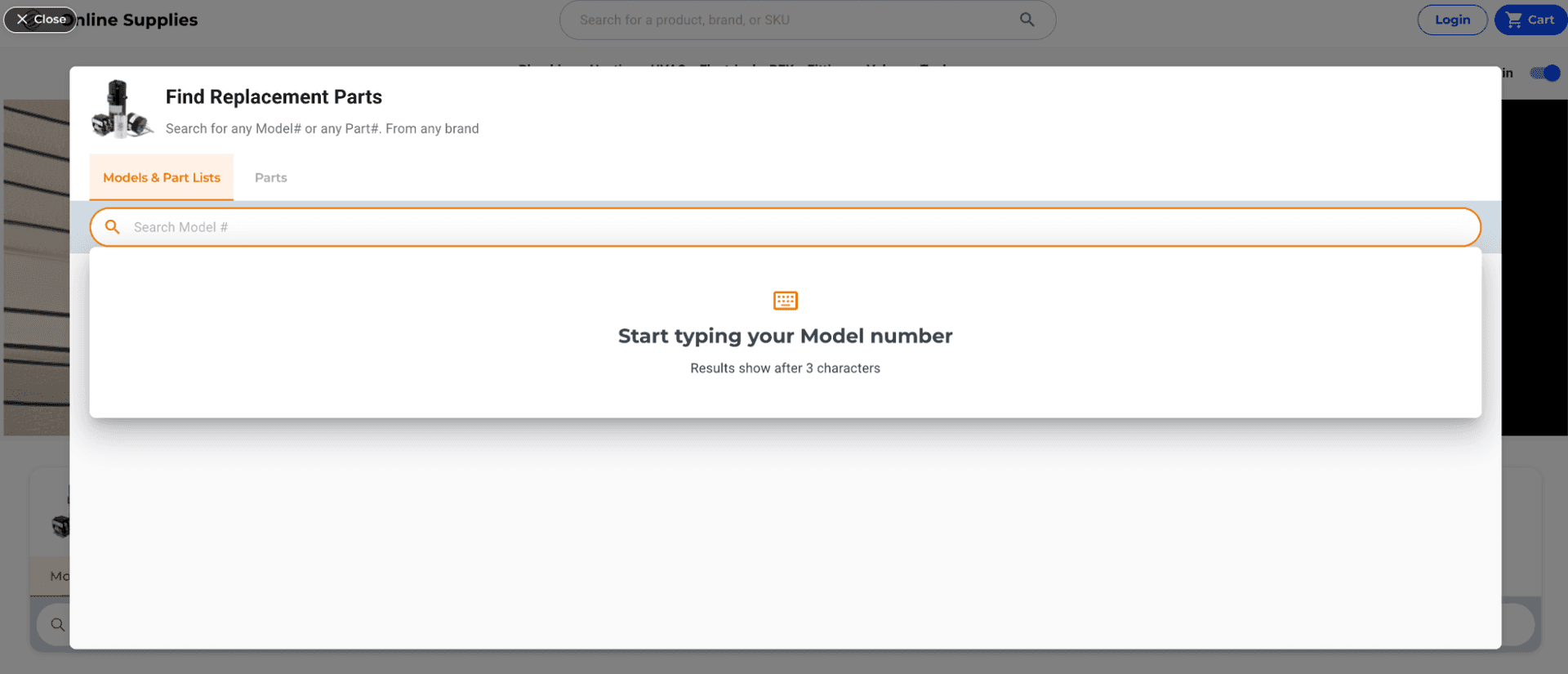
Once inside the modal, the user can switch the search type and perform any of the available actions according to the granted permissions.
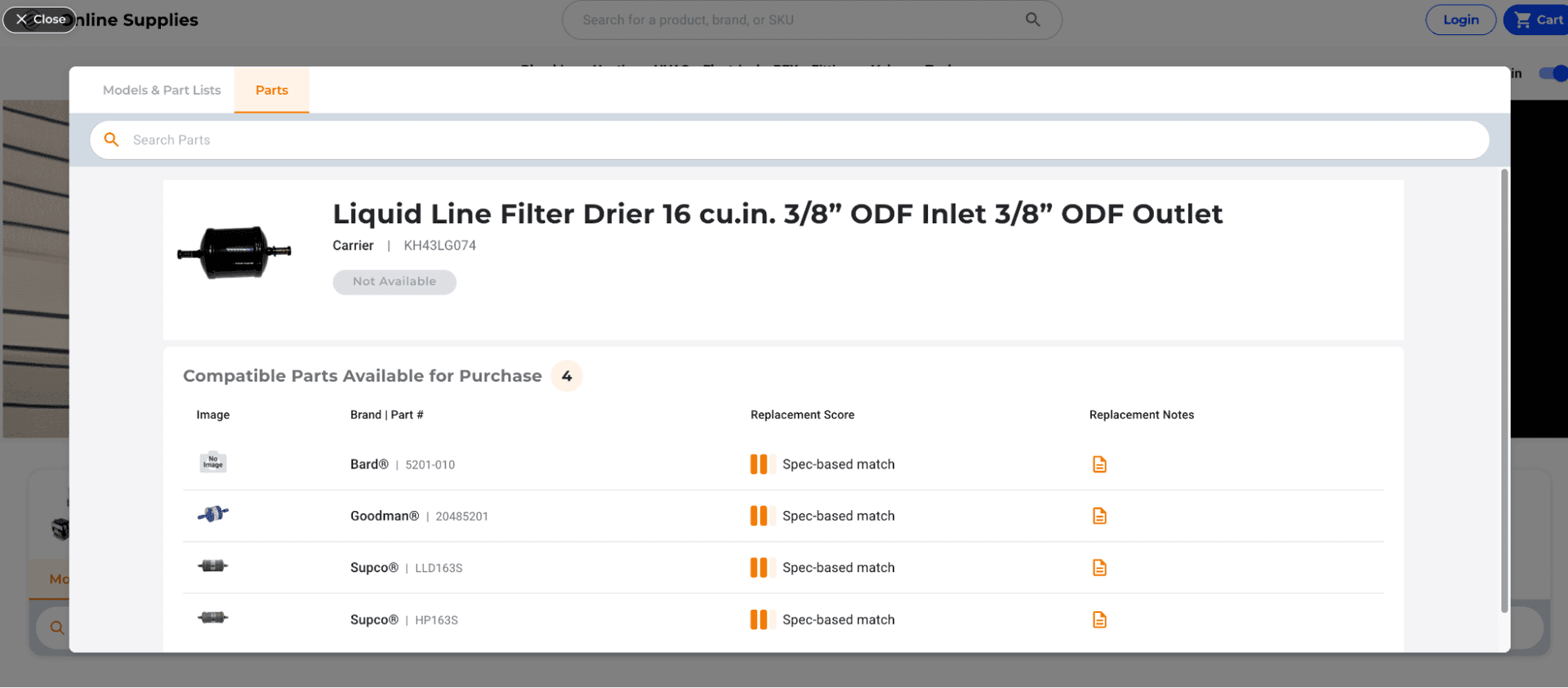
As long as the web component is not destroyed — either by navigating to a page that doesn't include it or by refreshing the current page — the modal can be closed at any time, and when reopened it retains the navigation state from where it was left off.
7. Customization
Certain customizations can be applied according to the partner's preferences.
Styles and Fonts
We can change the colors used in the Search component. Provide a Brand Color and we convert it into a palette of 10 colors to replace the standard Bluon blue. This applies to both the Search component and the initial web component. Primary and secondary fonts can also be customized from a limited set of available options. Because this configuration is performed at the database level, here is a short video illustrating the current behavior:
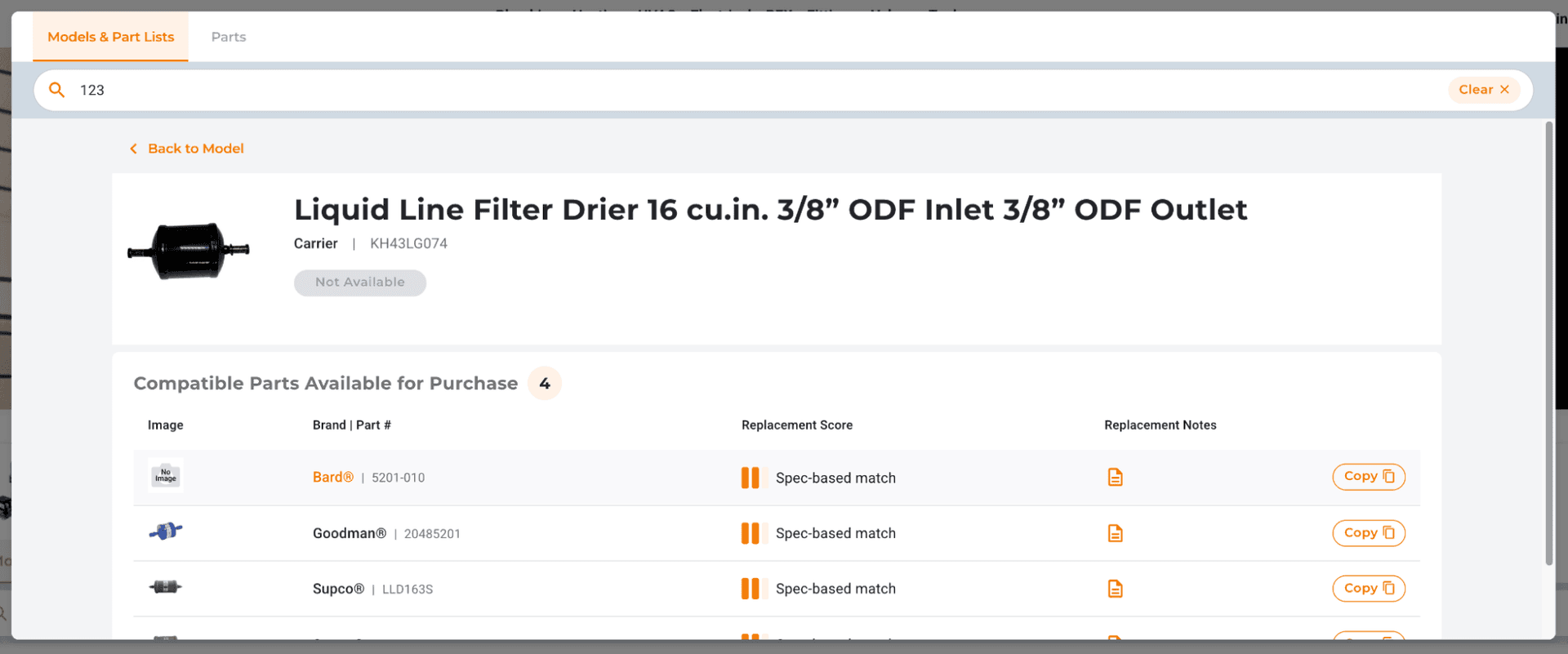
Watch the customization demo →Alternative Action: “Copy Part Number”
We can replace the standard “See Product” button with a “Copy Part Number” button. This is enabled for partners whose websites do not support direct links to product pages: it lets a user copy the part number and paste it directly into the partner's site search. This change applies to the action button on each part result within the Search component.
8. User Action Tracking
The User Action Tracking system allows tracking of user interactions within the application to understand user behavior, optimize performance, and enhance the overall experience. It supports built-in actions as well as custom actions via an API endpoint. Tracked events can include button clicks, form submissions, navigation events, and specific application-driven actions.
Supported Data Points
These values can be shared and associated with tracked actions, both within the application and for custom actions outside of it.
| Attribute | Description |
|---|---|
user-id | The unique identifier for the user. |
company-id | The unique identifier for the company. |
company-name | The name of the company. |
company-email | The email address of the company. |
company-zip-code | The postal code of the company. |
company-phone | The phone number of the company. |
Application Actions
The <bluon-search /> component allows these values to be passed via HTML attributes, making it easy to associate specific user or company data with the component.
<bluon-search
  user-id="user-123"
  company-id="12345"
  company-name="Company X"
  company-email="contact@companyx.com"
  company-zip-code="12345"
  company-phone="555-1234"
/>
Custom Actions via Endpoint
For tracking custom actions, an endpoint is provided where custom events can be logged using an authentication token for secure access. This token is provided by Bluon, and is valid only for the specified endpoint and environment.
Endpoint URL
POST [DOMAIN]/widget-api/v1/custom-action- UAT:
https://search-api.uat.bluontoolbox.com - Production:
https://search-api.prod.bluontoolbox.com
Required Headers
Authorization: Bearer [YOUR_ACCESS_TOKEN]Content-Type: application/json
Optional Headers
X-Api-User-IdX-Api-Company-IdX-Api-Company-NameX-Api-Company-EmailX-Api-Company-Zip-CodeX-Api-Phone
Request Body
The action field is required. Optionally, any parameters needed to complement the action (for example total-amount or items-count) can be sent in the body to provide a more complete picture of the action.
Example Request
Using the fetch API in JavaScript:
const token = "eyJ0eXAiOiJKV1QiLCJhbGciOiJIUzI1Ni...";

const response = await fetch(
  "https://search-api.uat.bluontoolbox.com/widget-api/v1/custom-action",
  {
    method: "POST",
    headers: {
      "Authorization": `Bearer ${token}`,
      "Content-Type": "application/json",
      "X-Api-User-Id": "user-123",
      "X-Api-Company-Id": "12345",
      "X-Api-Company-Name": "Company X",
      "X-Api-Company-Email": "contact@companyx.com",
    },
    body: JSON.stringify({
      "action": "add-to-cart",
      "total-amount": 105.50,
      "items-count": 5,
    }),
  }
);
Example Custom Actions
add-to-cartremoved-from-cartcart-purchasedcheckout-startedadd-to-wishlistclick-related-itemupdate-qtystock-inquiryAction names must follow kebab-case: all letters lowercase, with words separated by hyphens.
Ready to Get Started?
Our team will help you set up the E-Commerce Plugin, apply your brand customizations, and configure action tracking. Contact us to get your access token and discuss integration options.
Contact E-Commerce Team →Change Log
| Version | Description |
|---|---|
v.2025.07.16 | Initial version |